FarEarth Catalogue
The Catalogue allows you to find, view and download any data from your Archives. You can also view product Quality Reports directly in the Catalogue.
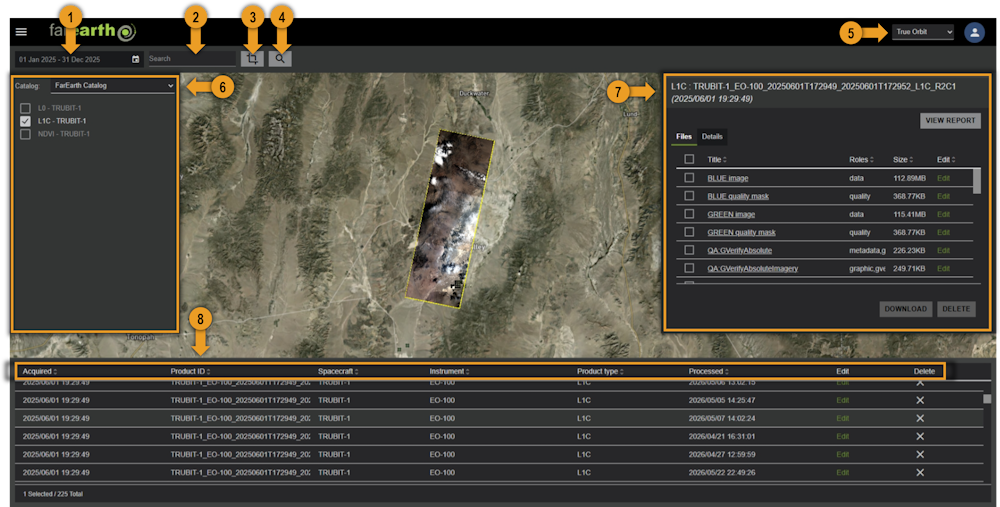
1. Date range filter
Filter products by their acquisition date.
2. Text search box
Search for products in the Catalogue using a text search, such as an order ID or sensor name.
To search for products created by a specific order, you can enter orderId=AAAA-1234.
When searching using the text search box, the date-range filter is also applied. Ensure that you choose the "Forever" preset in the date-range selection box, or enter choose the correct date range that will match the text search.
3. Map area selection (crop) tool
Restrict the search to a specific area on the map. For instructions on how to use the crop tool, see how-to search for data.
4. Search button
Click the SEARCH button to perform the search.
5. Switch organisation
Choose between your personal account or one of the organisations that you belong to using this dropdown menu.
6. Catalogue and Collections panel
If your subscription is linked to multiple FarEarth Catalogues, choose the correct one from the list. Limit the search to specific Collections, or keep unchecked to search through all of them.
7. Product detail panel
The product detail panel will show information about the product. You can view and download the files of a product in the "Files" tab.
8. Sort by product properties
Choose any of the properties to sort the product list by it. Click a second time to toggle between ascending and descending sorting.