FarEarth Orders view
The Orders page provides an overview of all active and past Orders.
Learn more about Orders.
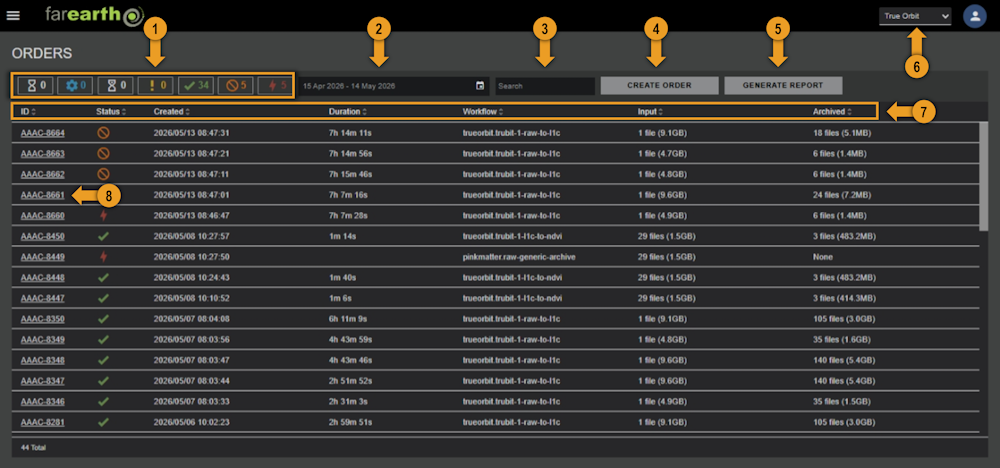
1. Order status filters
Filter your Orders according to their status.
| Filter button | Description |
|---|---|
 | Order is queued for processing |
 | Order is being processed |
 | Order is waiting for processing resources to become available |
 | Order is paused and waiting for intervention |
 | Order completed processing successfully |
 | Order has been cancelled by an operator |
 | Order failed to process |
2. Date range filter
Filter the list of orders by a range of dates.
3. Text search
Filter the list with keywords such as Order IDs.
4. Create a new Order
Click the CREATE ORDER button to manually start a new order through the FarEarth browser interface.
5. Generate an Order report
Start the process of generating a processing report. The report contains a summary of all the Orders completed for a specified period, including information such as the success rate and the total area processed.
6. Switch organisation
Choose between your personal account or one of the organisations that you belong to using this dropdown menu.
7. Sort by Order property
Choose any of the properties to sort the order list by it. Click a second time to toggle between ascending and descending sorting.
8. Click Order to view details
Click on the Order ID to view more detailed information about each order.