FarEarth status view
The STATUS page provides an overview of all processing in the last 24 hours in FarEarth.
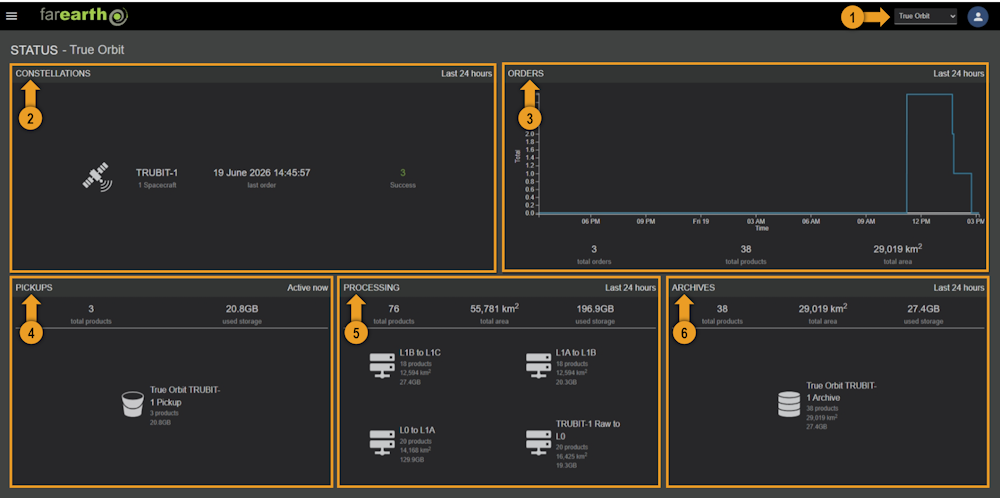
1. Switch organisation
Choose between your personal account or one of the organisations that you belong to using this dropdown menu.
2. Constellations panel
The Constellations panel provides an overview of your satellites and constellations. The panel shows
- Total number of orders processed in the last 24 hours
- Total number of successful orders
- Total number of failed orders
- Date and time of last processed order
3. Orders panel
The Orders panel provides statistics of the order processing throughput for the last 24 hours.
- A graph showing the total number of active orders in blue, and the total number of waiting orders in white
- Total number of orders processed in the last 24 hours
- Total number of output products stored in the Archive in the last 24 hours
- Total area (in km²) of products created in the last 24 hours
4. Pickups panel
The Pickups panel provides an overview of the input data currently actively being ingested for processing
- Total number of products being ingested for processing at this moment
- Total storage used in the active Pickups
The panel shows a bucket icon for each active Pickup, which will turn blue if there are data movement detected. Each bucket shows
- The number of Pickup locations being monitored for new data
- Total number of products present in the bucket
- Total size of the data in the bucket
5. Processing panel
The Processing panel provides an overview of the data being processed in the last 24 hours
- Total number of products processed
- Total area (in km²) of data processed
- Total amount of storage used for processing
The panel shows a processor icon for each active processing cluster, which will turn blue if there are any processing activity. Each processor shows
- Total number of products created
- Total area (in km²) of data processed
- Total amount of storage used for processing
6. Archives panel
The Archives panel provides an overview of the output products created by FarEarth in the last 24 hours
- Total number of products created
- Total area (in km²) of products created
- Total amount of storage used in the Archive
The panel shows a storage icon for each active storage destination, which will turn blue if there are data movement detected. Each storage item shows
- The number of Archive locations being targeted for storage
- Total number of products stored
- Total area (in km²) of products stored
- Total amount of storage used